How it works
Each friend is a light. When they’re free, it pulses in the color you chose for them.
Try the lights
Press the beacon’s button, wave to a friend, or tap their “Come by!” button to head over and flash in sync. The lights show what happens.
See who’s free
Bea and Cato are free, so their lights pulse. Dev is busy: dim green, no pulse. The white light in the center is you.
Try a friend’s action
These buttons simulate Bea’s choices in her app. Tap an active visit again to end it.
Signed in as You
Who can see your status
Seeing a gathering
The idea is that seeing friends’ lights pulsing together might make you want to head over too. You can notice a hangout forming without anyone having to organize a group text.
When Bea chooses “Heading to Cato,” their lights take Cato’s color and pulse together. To see that, you need permission to see both people and a slot for each on your beacon.
If Cato isn’t visible to you, Bea’s light stays dim in her usual color. The server leaves Cato’s identity out of the update it sends to your device. Just hiding the name in the app wouldn’t be enough: the shared color would still give it away.
“Heading to” is something you choose. There’s no location tracking. The visit ends when the status is turned off, expires, or the destination is cleared.
Other signals
A slot can also show a binary signal, like “Sunny in SF”: sunny or not sunny. It’s another thing you can check at a glance, alongside your friends.
In the app
Choose your friends, set your status, or wave hello.
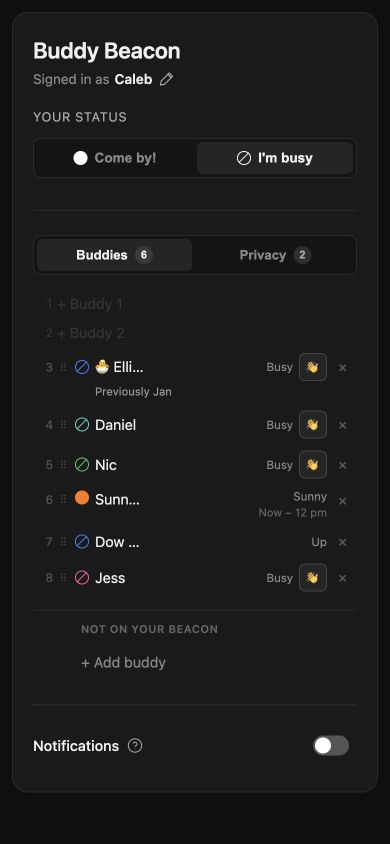
The app lets you choose who appears on your beacon and assign each friend a color. You can change your availability here too, or say whose place you’re heading to.
The Privacy tab controls who can see you. A wave is one tap beside a friend’s name.
Open Buddy Beacon ↗Waving
A wave says hi without changing your availability. (Yes, a bit like the Yo app, but with lights.) It briefly sweeps around the other person’s ring in your assigned color (or a neutral color if you aren’t on their beacon).
Next: the process →